
Download NutshellPro – Efficient AI Summarizer for Video & Audio
Overview
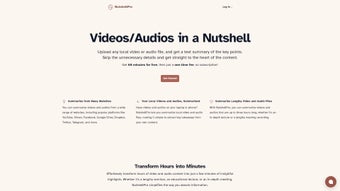
In an age where multimedia content dominates learning, training, and entertainment, the ability to extract key information quickly is a true productivity booster. NutshellPro steps into this space as an advanced AI‑powered web application designed specifically for summarizing video and audio files. Whether you’re a student trying to condense lecture recordings, a marketer needing highlights from a webinar, or a podcaster looking to generate episode synopses, NutshellPro delivers concise, human‑readable text summaries in seconds.
The tool works directly in the browser – no software installation is required – and supports a wide range of media formats, from MP4 and MOV to MP3 and WAV. By focusing on relevance and brevity, it removes the noise of filler content, allowing users to grasp essential points without watching or listening to the entire file. The service emphasizes security; all uploads are processed in a sandboxed environment and are automatically deleted after summarization.
To get the best experience, ensure JavaScript is enabled in your browser settings. NutshellPro is free to use, with optional premium upgrades for higher‑volume processing and advanced customization options. In short, it’s a straightforward yet powerful solution for anyone who values time and wants to stay informed without the overwhelm of lengthy media.
Key Features that Make NutshellPro Stand Out
- AI‑Driven Summarization Engine: Utilizes state‑of‑the‑art natural language processing models to capture the most important concepts from any video or audio file.
- Multi‑Format Support: Accepts MP4, MOV, AVI, MKV, MP3, WAV, AAC and many other common formats, eliminating the need for pre‑conversion.
- Instant Cloud Processing: Upload your file, and the AI processes it on secure cloud servers, delivering a text summary within minutes, regardless of file length.
- Adjustable Summary Length: Choose between short (one‑paragraph), medium (bullet points), or detailed (full‑page) summaries to match your workflow.
- Highlight Extraction: In addition to a full summary, NutshellPro can pull out timestamps for key moments, making navigation back to the original media effortless.
- Privacy‑First Architecture: Files are encrypted during upload and automatically purged after summarization, ensuring no lingering data on the server.
- Cross‑Platform Accessibility: Works on any modern browser across Windows, macOS, Linux, Android, and iOS – no OS‑specific client needed.
- Export Options: Summaries can be downloaded as plain text, PDF, or copied directly to the clipboard for immediate use.
- Free Tier & Premium Add‑Ons: The free plan covers up to three 30‑minute files per day, while paid plans unlock higher limits, priority processing, and API access.
- Seamless Integration: API endpoints allow developers to embed summarization capabilities into existing LMS, CRM, or content‑management workflows.
Installation, Usage & Compatibility
Getting Started – No Installation Required
NutshellPro is a pure web application, meaning you can start summarizing media straight from your browser. To begin, navigate to the official website, click the “Upload Media” button, and select the video or audio file you wish to summarize. Once the upload completes, choose your preferred summary length and click “Generate Summary.” The AI engine will begin processing, and a progress bar will keep you informed. Within moments, a concise text block appears, ready for you to copy, download, or share.
Step‑by‑Step Instructions
- Open NutshellPro.com in any modern browser (Chrome, Firefox, Edge, Safari).
- Ensure JavaScript is enabled – most browsers have this on by default.
- Click the “Upload Media” button and browse for your file (max 500 MB on the free tier).
- Select the desired summary style: Brief, Bullet Points, or Full Detail.
- Optionally add tags or keywords to guide the AI’s focus.
- Press “Generate Summary.” The system will display a real‑time progress indicator.
- When complete, review the summary, adjust length if needed, and click “Download PDF” or “Copy to Clipboard.”
- For frequent users, create a free account to track past summaries and set default preferences.
Compatibility – Works Everywhere
Because NutshellPro runs entirely in the cloud, it is compatible with any operating system that supports a modern web browser. This includes:
- Windows 10/11 (Chrome, Edge, Firefox, Safari)
- macOS Monterey and later (Safari, Chrome, Firefox)
- Linux distributions with Chrome or Firefox
- Android 8.0+ (Chrome, Firefox)
- iOS 13+ (Safari, Chrome)
No additional plugins, extensions, or runtime environments are required. The only prerequisite is a stable internet connection for uploading files and receiving the AI‑generated summary.
Pros, Cons & Frequently Asked Questions
Pros
- Fast, AI‑driven summarization saves hours of manual review.
- Supports a wide range of audio and video formats.
- Browser‑based – no installations, updates, or licensing hassles.
- Privacy‑focused: files are encrypted and deleted after processing.
- Free tier sufficient for casual users; premium plans scale with needs.
- Export options (TXT, PDF) streamline sharing and documentation.
Cons
- Free tier limits file size and daily processing volume.
- Large, high‑resolution video files may take longer to upload.
- Summary quality can vary with heavily accented speech or noisy audio.
- No offline mode – an internet connection is mandatory.
FAQ – Your Questions Answered
Is NutshellPro really free?
Yes, the basic plan is free and allows up to three 30‑minute files per day. Premium subscriptions unlock higher limits, faster processing, and API access.
What file formats can I upload?
NutshellPro accepts most common video and audio formats, including MP4, MOV, AVI, MKV, MP3, WAV, AAC, and more. If your file isn’t listed, try converting it to MP4 or MP3 first.
How secure is my uploaded media?
Security is a top priority. Files are encrypted during transfer, processed in an isolated environment, and automatically deleted from the server within 30 minutes after summarization.
Can I integrate NutshellPro with other tools?
Absolutely. Premium users receive API credentials that allow you to embed summarization functionality into LMS platforms, CRMs, or custom workflows.
What if the summary misses important points?
The AI model continuously learns from user feedback. If you notice gaps, you can submit a correction through the “Feedback” button, helping improve future results.
NutshellPro delivers exactly what its tagline promises – a quick, reliable way to condense lengthy multimedia content. The user interface is clean, the processing speed is impressive for most files, and the privacy safeguards give peace of mind. While the free tier’s limits may push power users toward a subscription, the value proposition remains strong for educators and professionals alike. The occasional hiccup with noisy audio is a minor trade‑off for the overall convenience.
Conclusion – Boost Your Productivity Today
If you spend any amount of time listening to recordings or watching long videos, NutshellPro is a tool worth adding to your workflow. By turning hours of media into bite‑sized, searchable text, it frees up mental bandwidth for analysis, decision‑making, and creative work. The web‑based approach eliminates the hassle of installations, and the free tier is generous enough for occasional use. For power users, the premium plan offers scalable limits, priority processing, and an API that can be woven into existing systems.
Ready to experience faster learning and smarter content consumption? Download NutshellPro now and start generating instant summaries of your videos and podcasts. Empower yourself to focus on what truly matters – the insights, not the playback time.



.png)



